
Features
Everything you need to learn to DJ
A real DJ studio, a structured academy and a rewards system that makes practice feel like a game. All in your browser, with nothing to install.
The DJ Studio
Two decks and a mixer, right in your browser
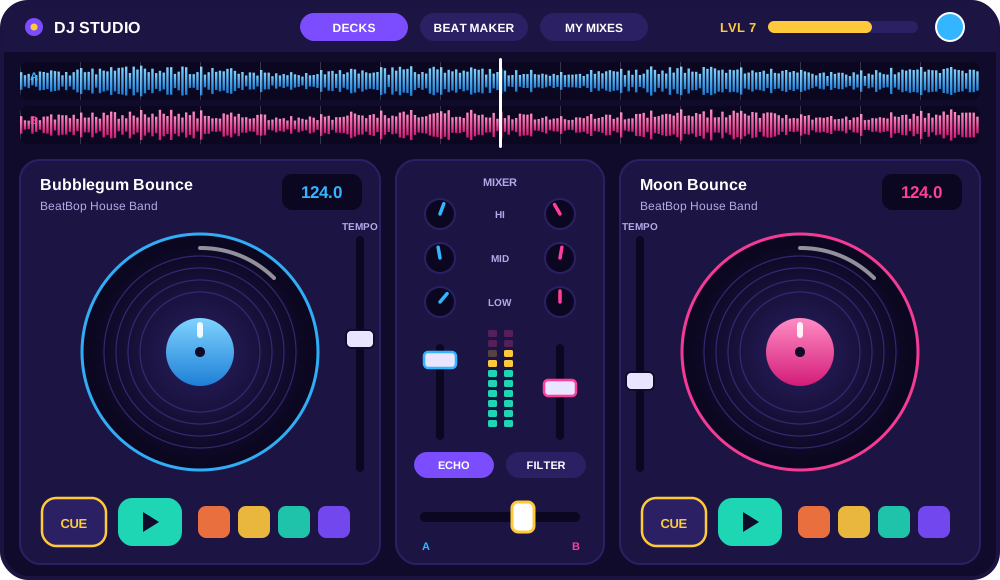
Our custom audio engine plays two tracks at once with real-time effects, so you learn the same moves pro DJs use.
What’s inside
Dual decks
Load two tracks and play them together. Play, pause, cue, jog and scratch, just like real turntables.
Club-style mixer
Crossfader, channel faders, master volume and a 3-band EQ (bass, mid, treble) with kills.
Waveforms & beat grids
See the music: full-track overviews, a zoomed scrolling waveform and beat markers on every bar.
BPM, tempo & sync
Read each track's BPM, nudge the tempo fader to beat-match by ear, or tap Sync to lock them together.
Hot cues & loops
Jump to your favourite moments with coloured hot cues and loop any part of a track, from ½ to 16 beats.
Scratching
Grab the platter and scratch forwards and backwards, with a vinyl brake and spin-back.
Live audio effects
Echo, reverb, delay, filter, flanger, bass boost, high- and low-pass, and vinyl scratch simulation.
Sampler pads
Air horns, sirens, scratches, claps, drum rolls, bass drops and crowd cheers, ready to fire on the beat.
Beat maker
Program kicks, snares, hats and percussion on a step grid, choose a drum kit and play it over your mix.
Recording studio
Record your whole performance, play it back, rename it and keep it in your private mix library.
Music library
Browse by genre, search, preview in your headphones and drag tracks onto Deck A or Deck B.
Guided mode
Lessons light up the exact control to use next, while DJ Kiddo cheers you on.
Learning that sticks
An academy built into the decks
- 20 progressive lessons across Beginner, Intermediate and Advanced
- Guided studio mode highlights each control as you learn it
- Clear, kid-friendly explanations for every skill, with room for video demos
- Quick quizzes and practical challenges after every lesson
- Progress tracking for kids, with reports for parents
Play to progress
Rewards that keep them coming back
- XP and 20 DJ levels, from Rookie to Superstar DJ
- 16 badges and trophies like First Spin and Scratch Star
- Daily and weekly challenges with bonus XP
- Unlockable DJ characters and studio themes
Works where you are
Computers and tablets today. Apps next.
Any modern browser
Chrome, Edge, Firefox and Safari on Windows, Mac and Chromebook. No plug-ins, nothing to install.
Touch-friendly
Tablets get big touch controls. Spin the platters with your fingers and tap the pads.
iOS & Android apps
Native apps are on the roadmap and will use the same account, levels and saved mixes.
Ready to drop your first beat?
Try the studio now, no sign-up needed. A grown-up can create a free family account in two minutes to save mixes and earn badges.